
Yes, you can absolutely get Apple CarPlay in a car that doesn’t have it built-in. The good news is that technology has made it surprisingly accessible to enjoy the seamless integration of your iPhone with your vehicle’s infotainment system, even in older cars. This guide will walk you through the various methods, from simple adapters to full stereo replacements, to help you achieve this.
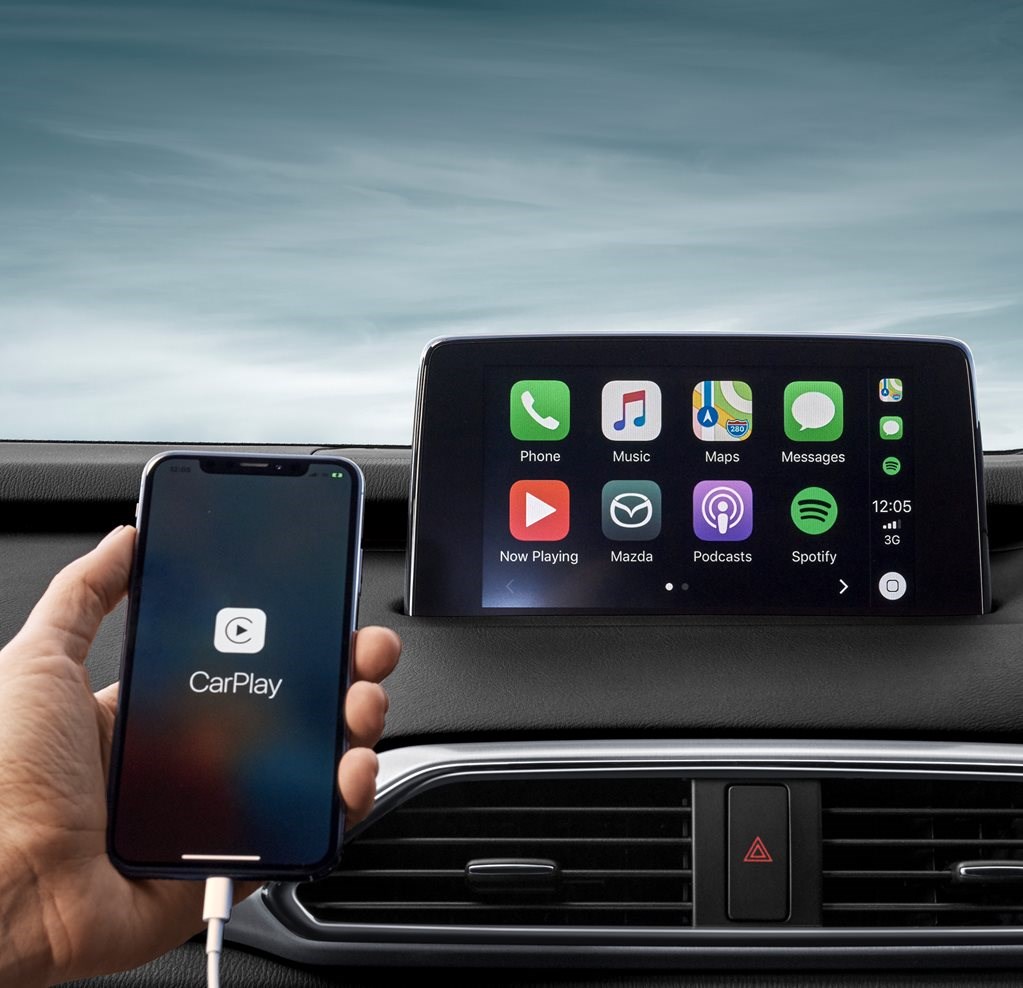
Image Source: car-images.bauersecure.com
Bringing Your Older Car into the CarPlay Era
Many drivers love the convenience and safety features that Apple CarPlay offers. It lets you use essential iPhone apps like maps, music, and messaging through your car’s display, often with voice control via Siri. If your car rolled off the assembly line before CarPlay became standard, don’t despair! You have several excellent options for adding CarPlay to older car models. We’ll explore how to upgrade your driving experience without needing to buy a brand-new vehicle.
CarPlay Retrofit: More Than Just an Upgrade
A CarPlay retrofit isn’t just about adding a new feature; it’s about modernizing your car’s technology. It enhances your daily commute, road trips, and even short drives by making your smartphone’s functionalities readily available and safe to use. The process of installing CarPlay can range from a plug-and-play solution to a more involved installation, depending on the chosen method.
Option 1: The CarPlay Adapter – A Simple Solution
One of the easiest ways to get CarPlay is by using a CarPlay adapter. These devices are designed to connect to your car’s existing infotainment system, often via USB or even wirelessly.
How CarPlay Adapters Work
These clever little boxes act as a bridge. They take the CarPlay signal from your iPhone and transmit it to your car’s display. Many adapters can connect wirelessly to your iPhone via Wi-Fi and Bluetooth, offering a wireless CarPlay upgrade without any physical connection after the initial setup.
Types of CarPlay Adapters
- USB Adapters: These plug into your car’s existing USB port (if it supports data transfer) and then your iPhone plugs into the adapter. This is often the most straightforward method.
- Wireless Adapters: These typically connect to your car’s existing Apple CarPlay-compatible USB port and then communicate wirelessly with your iPhone. This offers the ultimate convenience.
Pros of CarPlay Adapters:
- Easy Installation: Most adapters are plug-and-play, requiring no complex wiring or technical knowledge.
- Cost-Effective: Generally cheaper than replacing the entire stereo system.
- Portability: You can easily move the adapter between cars if needed.
- Preserves Original Dashboard: Keeps your car’s factory look intact.
Cons of CarPlay Adapters:
- Compatibility: Not all car stereos are compatible with these adapters, especially very old or very basic units. You’ll need to check compatibility lists.
- Performance: Some adapters might have slightly slower response times compared to integrated CarPlay.
- Dependence on Existing USB: Relies on your car having a functional USB port capable of data transfer.
Finding the Right CarPlay Adapter
When looking for an adapter, always check reviews and the manufacturer’s compatibility list. Brands like Carlinkit and Ottocast are popular choices. Ensure it supports Bluetooth CarPlay if you desire wireless connectivity.
Option 2: Aftermarket CarPlay Stereos – The Full Transformation
For a more integrated and often superior CarPlay experience, consider an aftermarket CarPlay stereo. This involves replacing your car’s existing head unit (the stereo system) with a new one that has CarPlay built-in.
What is an Aftermarket CarPlay Stereo?
An aftermarket CarPlay stereo is a new in-dash receiver that replaces your car’s original radio. These modern units come with touchscreens and boast a wide range of features, including Apple CarPlay and often Android Auto, Bluetooth, satellite radio, backup camera inputs, and more.
Types of Aftermarket Stereos:
- Single-DIN Units: These are smaller units that fit into older dashboards or require a mounting kit for installation. They often have smaller screens or pop-out screens.
- Double-DIN Units: These are larger, rectangular units that fit into most modern dashboard openings and offer larger touchscreen displays.
The Process of Installing an Aftermarket Stereo:
Installing CarPlay in this manner is a more involved process, often requiring some technical skill or professional installation. Here’s a general outline:
- Choosing the Right Stereo: Select a stereo that fits your car’s dashboard space (single-DIN or double-DIN) and has the features you want, including Apple CarPlay.
- Wiring Harness and Dash Kit: You’ll likely need a vehicle-specific wiring harness adapter to connect the new stereo to your car’s existing wiring without cutting or splicing. A dash kit is also usually required to make the new stereo fit flush and look factory-installed in your dashboard.
- Mounting: The dash kit provides the frame for the new stereo.
- Connecting: Connect the wiring harness to the new stereo and your car’s wiring. Connect any necessary antenna adapters, steering wheel control adapters (if you want to retain button functionality), and USB extensions.
- Testing: Before fully reassembling the dashboard, test all functions: sound, CarPlay, Bluetooth, etc.
- Final Assembly: Secure the new stereo in the dash kit and reassemble any dashboard panels.
Pros of Aftermarket CarPlay Stereos:
- Full Integration: CarPlay is seamlessly built into the system.
- Superior Sound Quality: Often offer better audio processing and power than factory units.
- Enhanced Features: Access to modern features like larger touchscreens, GPS, better Bluetooth, and more.
- Improved Aesthetics: Can give your car’s interior a modern look.
- Wireless CarPlay: Many aftermarket units offer built-in wireless CarPlay.
Cons of Aftermarket CarPlay Stereos:
- Cost: More expensive than adapters, both for the unit and potentially installation.
- Installation Complexity: Can be challenging for DIYers; professional installation adds to the cost.
- Compatibility: While generally good, some vehicle-specific features (like climate controls integrated into the factory radio) might be lost or require special adapters.
Popular Aftermarket Stereo Brands:
- Pioneer: Known for excellent sound quality and feature-rich units.
- Kenwood: Offers a wide range of models with good performance.
- JVC: Another solid option with good value.
- Alpine: High-end units with premium features.
- Sony: Increasingly offering competitive CarPlay options.
Option 3: The CarPlay Dongle – A Wireless Solution
A CarPlay dongle is a small device that plugs into your car’s existing USB port and enables wireless CarPlay connectivity, even if your car’s factory system only supports wired CarPlay. This is a great way to achieve a wireless CarPlay upgrade without replacing the entire stereo.
How CarPlay Dongles Work
These dongles essentially convert your car’s wired CarPlay connection into a wireless one. You plug the dongle into your car’s USB port that supports CarPlay, and then pair your iPhone to the dongle via Bluetooth and Wi-Fi. Once paired, your iPhone will connect automatically whenever you start your car, giving you a wireless CarPlay experience.
Pros of CarPlay Dongles:
- Wireless Convenience: Eliminates the need to plug in your iPhone every time.
- Easy to Use: Simple plug-and-play setup.
- Cost-Effective Wireless: Cheaper than a new stereo system that offers wireless CarPlay.
- Maintains Original Look: No changes to your car’s dashboard.
Cons of CarPlay Dongles:
- Requires Existing CarPlay Port: Your car must already have a USB port that supports wired CarPlay.
- Potential for Lag: Some dongles might introduce a slight delay in response times.
- Reliability: Quality can vary between brands; some may be more prone to disconnects.
What to Look for in a CarPlay Dongle:
- Compatibility: Crucially, ensure your car’s USB port supports wired CarPlay.
- Wireless Protocol: Look for Wi-Fi (5Ghz is often better for speed) and Bluetooth support.
- Automatic Connection: Most users want a dongle that connects automatically.
- Firmware Updates: Check if the manufacturer provides regular updates.
Option 4: iPhone Mirroring in Car – A Limited Alternative
While not true CarPlay, iPhone mirroring car solutions allow you to display your iPhone’s screen on your car’s infotainment system. This is a workaround for cars that don’t support CarPlay at all and might not be compatible with adapters or dongles.
How iPhone Mirroring Works
These methods typically involve specific apps or hardware that capture your iPhone’s display and send it to your car’s screen, usually through an AUX input or by simulating a video source. Some solutions use a CarPlay adapter that also offers mirroring capabilities, or a standalone device.
Types of iPhone Mirroring:
- App-Based Mirroring: Some apps claim to mirror your phone to your car, often requiring a specific setup.
- Hardware Mirroring Boxes: Dedicated devices that connect to your car’s video input (if available) and receive the mirrored signal from your iPhone.
- Some Aftermarket Stereos: Certain aftermarket stereos that don’t have native CarPlay might offer screen mirroring.
Pros of iPhone Mirroring:
- Works with Non-CarPlay Cars: The primary advantage is that it can work in cars that have no CarPlay support whatsoever.
- Basic Functionality: Can display maps and some simple apps.
Cons of iPhone Mirroring:
- Not True CarPlay: Lacks the optimized interface, Siri integration, and full app support of CarPlay.
- Limited App Compatibility: Many apps won’t work correctly or safely in a mirrored state.
- Touchscreen Interaction Issues: Touchscreen controls often don’t transfer, requiring you to use your phone directly, which is unsafe.
- Audio Issues: Audio may need to be routed separately.
- Complex Setup: Can be more technically challenging to set up.
- Safety Concerns: Using your phone directly while driving is dangerous and illegal in many places.
Recommendation: While mirroring might seem like an option, for safety and functionality, striving for genuine CarPlay via an adapter or aftermarket stereo is highly recommended.
Converting Car to CarPlay: A Step-by-Step Approach
So, you’ve decided to upgrade. Here’s a breakdown of how to go about converting car to CarPlay:
Step 1: Assess Your Current System
- Check for Existing CarPlay Support: Does your car have a USB port labeled “CarPlay” or does it appear in your car’s menu? If so, a CarPlay adapter or CarPlay dongle is your easiest route.
- Identify Your Stereo Size: Is your current stereo a single-DIN or double-DIN unit? This is crucial if you’re considering an aftermarket CarPlay stereo. Measure the opening if unsure.
- Determine Your Budget: How much are you willing to spend? Adapters are generally under $100, while aftermarket stereos can range from $150 to $500+ (plus installation).
Step 2: Choose Your Method
Based on your assessment, decide which option best suits your needs and budget:
- Easiest & Cheapest: CarPlay Adapter (if your car has a USB port that supports CarPlay).
- Wireless Convenience (Existing CarPlay Port): CarPlay Dongle.
- Most Integrated & Feature-Rich: Aftermarket CarPlay Stereo.
- Last Resort (Limited): iPhone Mirroring (if no other option is viable and you understand the limitations).
Step 3: Research and Purchase
- CarPlay Adapters/Dongles: Read reviews, check compatibility lists (many manufacturers have them on their websites), and look for brands with good reputations.
- Aftermarket Stereos: Research brands, features, and look for models that come with a CarPlay retrofit kit or are known to be compatible with your vehicle using specific dash kits and wiring harnesses. Websites like Crutchfield are excellent resources for checking vehicle compatibility.
Step 4: Installation
- DIY vs. Professional:
- CarPlay Adapters/Dongles: Usually plug-and-play, no professional help needed.
- Aftermarket Stereos: If you’re comfortable with car electronics and have the right tools, you can do it yourself. If not, a professional installation at an car audio shop is recommended. This can add $100-$300 to the overall cost.
Step 5: Connect and Enjoy
Once installed, connect your iPhone and follow the on-screen prompts to pair. You should now have a fully functional CarPlay system!
Popular Scenarios and Solutions
Let’s look at common situations and the best ways to achieve CarPlay:
Scenario 1: My car has a USB port but no CarPlay.
- Solution: A CarPlay adapter is your best bet. Plug it into the USB port, connect your iPhone, and you should be up and running. If you want wireless, look for a wireless CarPlay adapter.
Scenario 2: My car has wired CarPlay, but I want wireless.
- Solution: A CarPlay dongle is perfect for this. Plug it in, pair your phone, and enjoy wireless freedom. This is a very popular wireless CarPlay upgrade.
Scenario 3: My car is quite old (e.g., pre-2015) and has no USB port for data.
- Solution: You’ll likely need an aftermarket CarPlay stereo. This will require replacing the entire head unit. You might need to run a new USB cable from the back of the stereo to a convenient location (like a glove box or center console). This is a more significant CarPlay retrofit.
Scenario 4: My car has a very basic radio and no screen.
- Solution: An aftermarket CarPlay stereo is the only way to get a screen and CarPlay functionality. You’ll be converting car to CarPlay from scratch.
Key Considerations for a Smooth Upgrade
- Steering Wheel Controls: If you want to retain control of your stereo functions (volume, track skipping) from your steering wheel, you’ll need a steering wheel control interface adapter when installing an aftermarket stereo.
- Factory Features: Some modern cars integrate climate control, vehicle settings, and backup cameras into the factory infotainment screen. When installing an aftermarket stereo, you may need special adapters to retain these functions.
- USB Port Type: Ensure your car’s USB port is capable of data transfer, not just charging. If not, you’ll need to run a new USB cable for aftermarket stereos.
- Sound System: If you have a premium factory sound system with external amplifiers, you might need specific adapters to integrate the new stereo correctly.
Frequently Asked Questions (FAQ)
Q1: Can I get CarPlay in my car if it only has Bluetooth?
A1: Yes, if your car’s Bluetooth system supports data transfer for specific functions, a CarPlay adapter or CarPlay dongle might work. However, if your car only supports Bluetooth for phone calls and audio streaming, you might need an aftermarket CarPlay stereo to get full CarPlay functionality. Always check compatibility.
Q2: Will installing an aftermarket stereo void my car’s warranty?
A2: It depends on your car manufacturer’s warranty policy. Typically, modifications to the electrical system could affect warranty coverage for related components. However, a clean installation using proper adapters often minimizes this risk. It’s wise to check your warranty terms or consult your dealership.
Q3: How much does it cost to install CarPlay?
A3:
* CarPlay Adapters/Dongles: $30 – $100 (DIY installation).
* Aftermarket Stereo: $150 – $500+ for the unit.
* Professional Installation for Stereo: $100 – $300.
* Total for Aftermarket Stereo (DIY): $150 – $500+
* Total for Aftermarket Stereo (Professional): $250 – $800+
Q4: What is the difference between a CarPlay adapter and a CarPlay dongle?
A4: A CarPlay adapter generally aims to bring CarPlay to a car that has no CarPlay support but has a USB port. It might be wired or wireless. A CarPlay dongle specifically takes a car that already has wired CarPlay and makes that connection wireless.
Q5: Can I use my iPhone without plugging it in using a CarPlay adapter?
A5: Some CarPlay adapters are specifically designed for wireless connectivity. If you buy a wireless CarPlay adapter, you won’t need to plug your iPhone in after the initial setup.
Q6: Is it hard to install an aftermarket CarPlay stereo?
A6: For someone with basic car electronics knowledge, it can be a manageable DIY project, especially with the availability of vehicle-specific wiring harnesses and dash kits. However, if you’re not comfortable with car interiors or wiring, professional installation is recommended to ensure a proper and safe setup.
Q7: What does “iPhone mirroring car” mean?
A7: iPhone mirroring car refers to a technology that displays your iPhone’s screen on your car’s infotainment system. It’s not the same as CarPlay, which offers a dedicated, optimized interface for driving. Mirroring is often a workaround for cars without CarPlay support.
Q8: How can I ensure I get the best wireless CarPlay experience?
A8: For wireless CarPlay, ensure your chosen device (adapter, dongle, or aftermarket stereo) uses a strong Wi-Fi connection (5GHz is generally better than 2.4GHz). Keep your iPhone’s software updated, and ensure the CarPlay device also has the latest firmware.
By following this guide, you can effectively bring the convenience and advanced features of Apple CarPlay to virtually any car, transforming your driving experience and keeping you connected safely.