
Can a dash cam work when the car is off? Yes, many dash cams can continue to record when your car is off, but it depends on how they are powered and the features they offer. This guide will delve into the specifics of how dash cams operate in this state, covering everything from power sources to essential features that enable this functionality.
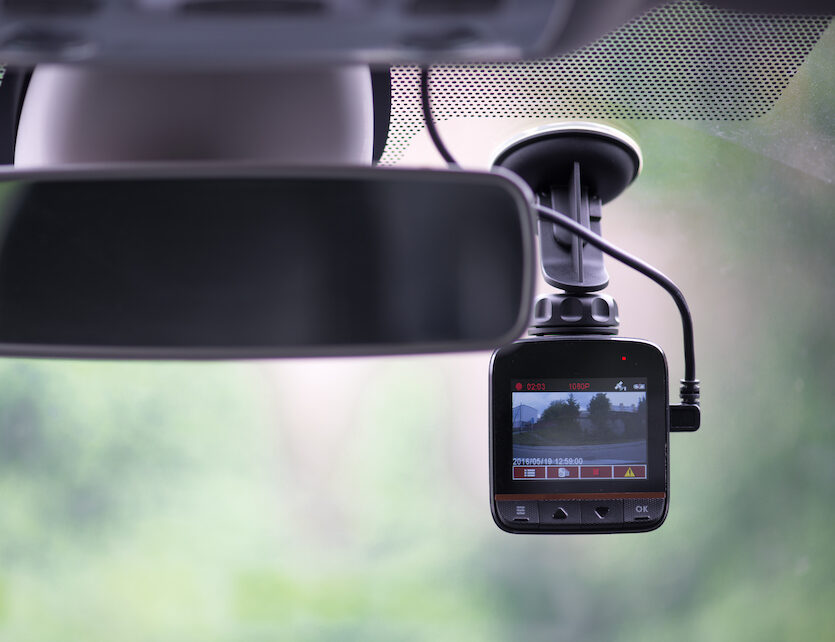
Image Source: insure2drive.co.uk
Deciphering Dash Cam Operation While the Engine is Silent
When your car’s engine is off, the dash cam typically relies on a different power source than the standard cigarette lighter or 12V accessory port, which are only active when the ignition is on. For a dash cam to keep recording without the car running, it needs a constant supply of power. This is where specific installation methods and dash cam features come into play.
The Crucial Role of Parking Mode
Parking mode is the key feature that allows dash cams to function when the car is off. This mode is designed to conserve power while still providing surveillance. When the ignition is turned off, the dash cam doesn’t simply shut down. Instead, it enters a low-power state, awaiting specific events to trigger a recording. This is essential to prevent excessive battery drain.
Powering Your Dash Cam: Beyond the Ignition
There are several ways a dash cam can receive power when the car is off:
Hardwiring for Continuous Power
The most common and reliable method for powering a dash cam when the car is off is through hardwiring. This involves connecting the dash cam directly to your car’s battery or fuse box. This bypasses the need for the car’s ignition to be on.
Benefits of Hardwiring:
- Constant Power: Ensures your dash cam always has a power source, regardless of the ignition status.
- Tidy Installation: Wires are neatly tucked away, eliminating dangling cords that can be unsightly or a hazard.
- Advanced Features: Many dash cams require hardwiring to unlock their full parking mode capabilities.
How Hardwiring Works:
Hardwiring typically involves using a fuse tap to connect the dash cam’s power wire to a fuse in your car’s fuse box. This fuse should be one that is permanently powered (always hot) or switched by the ignition. For continuous recording when the car is off, you’ll want to connect to a “always hot” fuse. This ensures a steady flow of electricity.
- Always Hot Fuses: These fuses receive power directly from the battery and remain active even when the car is off.
- Switched Fuses: These fuses are only powered when the ignition is on.
For parking mode, connecting to an “always hot” fuse is crucial. However, this also introduces the risk of battery drain if not managed correctly.
Smart Power Solutions
To mitigate the risk of battery drain from hardwiring, many hardwiring kits now come with smart power management systems. These systems monitor your car’s battery voltage and automatically shut off the dash cam when the voltage drops to a certain level. This prevents your car from being unable to start.
Key Smart Power Features:
- Low Voltage Cutoff: Protects your car battery from excessive discharge.
- Adjustable Voltage Settings: Allows you to customize the cutoff voltage based on your vehicle and battery type.
- Timer Settings: Some kits allow you to set a maximum recording duration in parking mode to further control power usage.
External Battery Packs
Another option is to use an external battery pack specifically designed for dash cams. These battery packs are charged while you drive and then provide power to the dash cam when the car is off. This is an excellent way to avoid battery drain altogether.
Advantages of External Battery Packs:
- No Battery Drain: Completely isolates the dash cam’s power from your car’s battery.
- Extended Recording: Can power the dash cam for significantly longer periods than relying solely on the car’s battery.
- Simple Installation: Usually plugs into the cigarette lighter and doesn’t require complex wiring.
Dash Cam Recording Modes When the Car is Off
Dash cams employ different recording strategies when the vehicle is parked to conserve power and storage space.
Parking Mode Recording Strategies
When your car is off, dash cams typically use one of the following parking mode recording strategies:
Motion Detection
Motion detection is a popular feature. When activated, the dash cam continuously monitors the view from its lens. If it detects movement within its field of view, it begins continuous recording. This is highly efficient as it only records when something potentially significant happens.
- How it Works: The dash cam’s processor analyzes the video feed. If there’s a change in pixels that indicates movement, it triggers a recording event.
- Pros: Saves storage space and power by only recording relevant events.
- Cons: Can be triggered by minor movements like blowing leaves or passing pedestrians, potentially missing a crucial event if it occurs outside the detection zone. False positives can also occur.
Impact Detection (G-Sensor)
Most dash cams include a built-in G-sensor. This sensor detects sudden changes in motion, such as impacts or vibrations. If the G-sensor registers a significant jolt, the dash cam will automatically start recording. This is invaluable for capturing incidents like hit-and-runs while parked.
- How it Works: The G-sensor measures acceleration and deceleration. A sudden impact will register as a strong reading.
- Pros: Excellent for capturing accidents or vandalism.
- Cons: Won’t record ambient events; only responds to direct impacts.
Time Lapse Recording
Time lapse recording captures a frame every few seconds (e.g., 1 frame per second). This creates a sped-up video of events while the car is parked. It significantly reduces the amount of data being recorded, conserving storage space and power. This can be useful for monitoring a longer period without the risk of missing subtle changes.
- How it Works: Instead of recording 30 frames per second, it records a fraction of that, making the footage appear to play faster.
- Pros: Allows for much longer recording durations on a single memory card and uses less power. Useful for observing long-term parking situations.
- Cons: You might miss rapid events that happen between captured frames. Fine details might be lost.
Standard Continuous Recording (Less Common in Parking Mode)
Some dash cams, especially those with a robust external battery pack, might offer continuous recording even when the car is off. This provides the most comprehensive footage but will consume power and storage the fastest. This is less common for battery-powered modes due to the high power draw.
Managing Power Consumption: The Art of Power Management
Effective power management is critical for ensuring your dash cam can operate when the car is off without draining your car’s battery.
Ignition Sensing for Smart Power
Many modern hardwiring kits feature ignition sensing. This allows the dash cam to detect when the car’s ignition is turned on or off. When the ignition is off, the dash cam switches to its parking mode. When the ignition is turned back on, the dash cam automatically resumes normal operation. This seamless transition is crucial for user experience.
Automatic Shutoff Mechanisms
As mentioned with smart power solutions, automatic shutoff is a vital component of power management. This feature ensures the dash cam doesn’t completely drain your car’s battery. It works by monitoring the car’s battery voltage. Once the voltage drops below a pre-set threshold, the dash cam powers down, preventing a dead battery.
Loop Recording: Efficient Storage
Loop recording is a standard feature on almost all dash cams, and it’s particularly important when recording in parking mode. This feature means that when the memory card is full, the dash cam automatically overwrites the oldest footage with new recordings. This ensures continuous recording without manual intervention and efficiently uses storage space.
- How it Works: The dash cam records footage in short segments (e.g., 1, 3, or 5 minutes). When the memory card is full, the oldest segment is deleted to make room for the newest one.
- Benefits: Eliminates the need to manually format the memory card and ensures you always have the most recent footage available.
Factors Influencing Dash Cam Operation When Off
Several variables can affect how well your dash cam functions when the car is parked:
Battery Health and Capacity
The health and capacity of your car’s battery play a significant role. A new, fully charged battery will tolerate more power draw than an older or weaker one. If your battery is already struggling, even a low-power dash cam parking mode could cause issues.
Ambient Temperature
Extreme temperatures, both hot and cold, can affect battery performance. In very cold weather, battery capacity is reduced, making it more susceptible to drain. In very hot weather, excessive heat can degrade the battery and potentially damage the dash cam’s internal components.
Dash Cam Power Consumption
Different dash cams have varying power requirements. Higher-resolution cameras, those with Wi-Fi capabilities, or those constantly performing complex motion detection will generally consume more power than simpler models.
Length of Parking
The longer you leave your car parked, the greater the potential for battery drain. If you only park for a few hours, the impact will be minimal. If you park for several days, even an efficient parking mode might become an issue.
Installation Methods: A Closer Look
The way your dash cam is installed directly impacts its ability to record when the car is off.
Method 1: Using the Cigarette Lighter Adapter (Limited Functionality)
- How it Works: The dash cam is plugged into the car’s 12V accessory socket (cigarette lighter).
- Operation When Car is Off: In most cars, the cigarette lighter socket is only powered when the ignition is on. Therefore, the dash cam will turn off as soon as you switch off the engine.
- Parking Mode: This method does not support parking mode or continuous recording when the car is off.
Method 2: Hardwiring to the Fuse Box (Recommended for Parking Mode)
- How it Works: As discussed earlier, the dash cam’s power cable is connected to the car’s fuse box, ideally using a fuse tap.
- Operation When Car is Off:
- If wired to an “always hot” fuse, the dash cam receives constant power and can operate in parking mode.
- If wired to a “switched” fuse, it will only work when the ignition is on.
- Parking Mode: This is the most common and effective method for enabling parking mode. The use of a smart power kit is highly recommended to prevent battery drain.
Method 3: Using an OBD-II Port Adapter
- How it Works: Some dash cams can be powered via the car’s OBD-II port. This port often provides constant power.
- Operation When Car is Off: Similar to hardwiring to an “always hot” fuse, this can provide continuous power.
- Parking Mode: This can support parking mode, but power management features are still crucial to avoid battery drain. It’s also important to ensure the OBD-II port is suitable for constant power draw in your vehicle.
Choosing the Right Dash Cam for Parking Mode
When selecting a dash cam with parking mode capabilities, consider these factors:
- Power Consumption: Look for dash cams with low power consumption in parking mode. Manufacturers often specify the amperage draw.
- Parking Mode Features: Ensure it offers motion detection, impact detection, or time lapse recording.
- Hardwiring Kit: Does it come with a compatible hardwiring kit, ideally with smart power features?
- Adjustable Settings: Can you adjust parking mode sensitivity or voltage cutoffs?
- Battery Pack Compatibility: If you prefer not to hardwire or are concerned about battery drain, check if it supports an external battery pack.
Potential Pitfalls and How to Avoid Them
- Battery Drain: The most significant concern. Always use a dash cam with smart power and automatic shutoff features if hardwiring. Consider an external battery pack if you park for extended periods or have an older car battery.
- False Positives in Motion Detection: Adjust motion detection sensitivity or consider using time lapse if you experience too many irrelevant recordings.
- Overwriting Crucial Footage: Loop recording is essential, but ensure your memory card is of sufficient capacity to store a reasonable amount of footage between overwrites.
- Memory Card Failure: Use high-quality, endurance-rated microSD cards designed for dash cams, as they are constantly being written to.
Frequently Asked Questions About Dash Cams When the Car is Off
Q1: Will my dash cam drain my car battery if it’s always plugged in?
A1: Not necessarily. If plugged into a socket that only receives power when the ignition is on, the dash cam will turn off with the car. If hardwired to a constantly powered circuit, it can drain the battery if it doesn’t have smart power management or an automatic shutoff feature. Always use a dash cam with these features for parking mode.
Q2: How long can a dash cam record in parking mode?
A2: This depends on the dash cam’s power consumption, the capacity of any external battery pack, or the health of your car’s battery and the smart power settings. Some can record for hours, while others with external batteries can last for days.
Q3: What is the difference between motion detection and impact detection in parking mode?
A3: Motion detection starts recording when it senses movement in its field of view. Impact detection (using the G-sensor) starts recording when it senses a sudden jolt or impact to the vehicle.
Q4: Can I use a regular USB power bank to power my dash cam in parking mode?
A4: Some dash cams might work with a standard USB power bank, but it’s not ideal. Dash cams designed for parking mode often have specific power management needs, and a standard power bank might not provide consistent enough voltage or might shut off automatically. Dedicated dash cam battery packs are a more reliable solution.
Q5: How do I know if my dash cam is compatible with parking mode?
A5: Check the product specifications. Dash cams that support parking mode will explicitly state this feature and often mention the required hardwiring kit or connection method.
Q6: Is it legal to record when my car is parked?
A6: Laws regarding recording vary by region. In most places, it’s legal to record the exterior of your vehicle and public spaces from your vehicle, even when parked. However, recording private property or individuals without consent may be illegal. Always check your local regulations.
Q7: What is loop recording and why is it important for parking mode?
A7: Loop recording allows the dash cam to continuously overwrite the oldest footage when the memory card is full. This is crucial for parking mode because it ensures that you have a continuous record of events without needing to manually manage storage, allowing for continuous recording.
Q8: How does ignition sensing help my dash cam when the car is off?
A8: Ignition sensing allows the dash cam to detect when the car is turned on or off. When the ignition is off, it automatically switches to parking mode. When the ignition is on, it resumes normal operation, ensuring seamless transitions and proper power management.
Q9: What is the purpose of a G-sensor in a dash cam?
A9: The G-sensor (gravity sensor) detects acceleration, deceleration, and impacts. In parking mode, it’s vital for triggering recordings when the vehicle is hit or experiences a sudden jolt, even if no visual motion is detected by the camera.
Q10: How can I prevent my dash cam from draining my car battery during cold weather?
A10: Cold weather reduces battery efficiency. Ensure your dash cam has a robust smart power system with a sufficiently high voltage cutoff. Consider using an external battery pack during extreme cold to completely bypass your car’s battery.